Scope and changes
We classify each request, estimate its impact and decide whether it is essential, a later improvement, an existing alternative or a change of scope.
Studio73 Method · from business to system
Before configuring an app, we understand how your company works, which data supports the operation and which decisions cannot fail. We move forward in validated phases, prioritize maintainable solutions and only develop custom software when it adds real value.
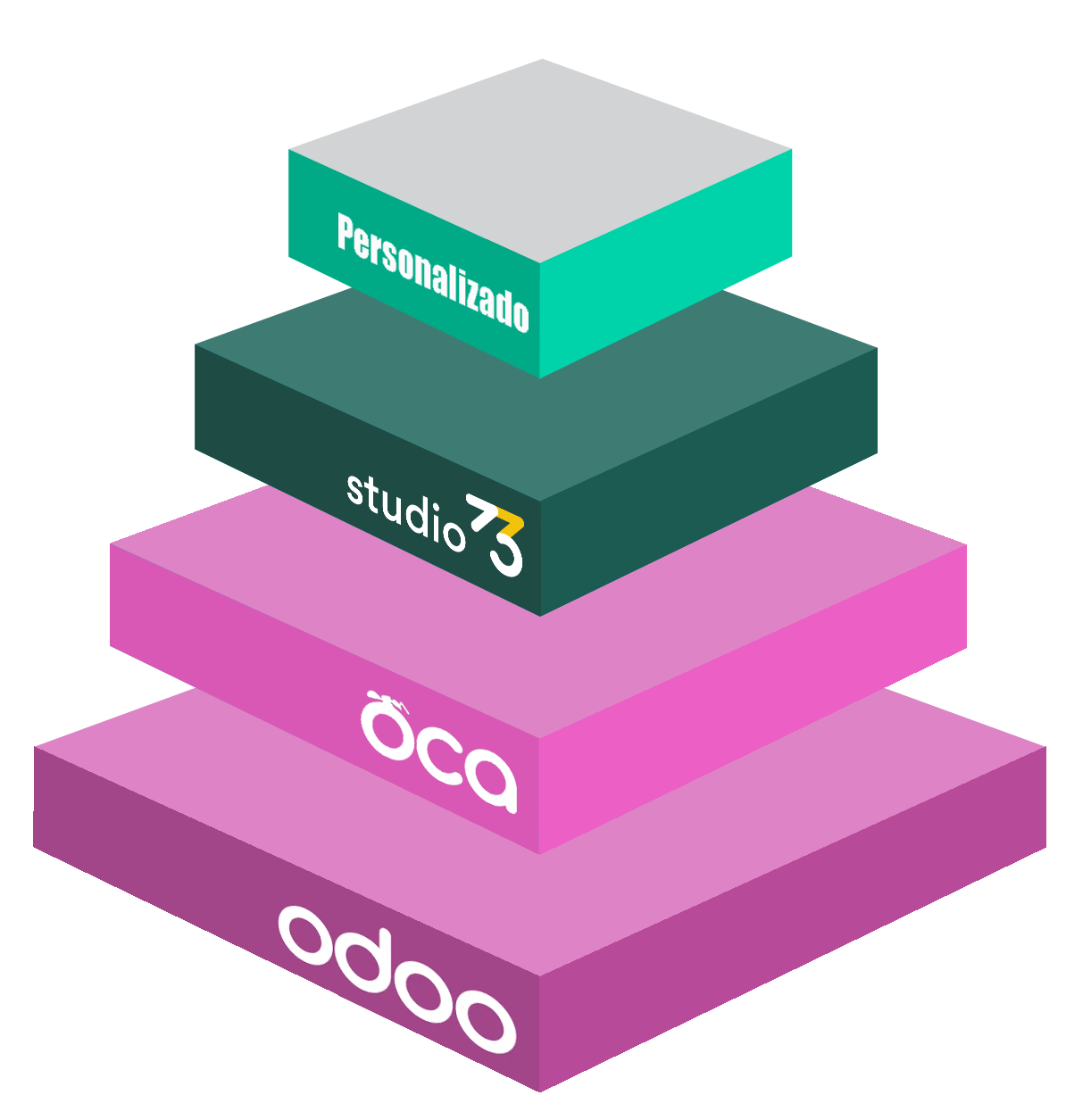
Choosing the right layer
Every need goes through four questions. This way we avoid building what already exists, reuse proven knowledge and reserve development for what truly sets the business apart.
First we check how to solve the process with native capabilities and the right configuration. It means less complexity and simpler upgrades.
We evaluate mature modules from the Odoo Community Association and review their quality, compatibility and maintenance for the specific context.
We add functional and usability improvements born from recurring needs observed in real projects, without treating each project as if it started from scratch.
We develop when there is a competitive advantage, a critical obligation or a process that the previous layers cannot solve responsibly.
The goal is not to have the fewest developments at any cost: it is to build the simplest solution that solves the business well and can be maintained sensibly.
Understand before configuring
It gets complicated when a process nobody has questioned is automated, unreliable data is migrated or validation is left until the end.
That is why the project does not begin with a list of modules. It begins by defining what must improve, how we will measure it and who can make decisions.
The six phases of the Studio73 Method
The aim is not to pile up documentation, but to prevent the project from moving forward on assumptions that later prove costly.
The sequence and scope of each phase are adapted to each project’s starting point and needs.
We talk to the areas involved and review processes, data, volumes, dependencies and integrations. We distinguish symptoms from causes.
We check each need against standard Odoo, OCA, the Studio73 Layer and specific development before committing to complexity.
We only configure and develop what has been approved. We work in short cycles on complete processes to correct things while it is still easy.
We define which information is migrated, how it is transformed and how it is reconciled. We test permissions, exceptions, integrations and representative volumes.
We train each profile on their real processes and finalize the cutover plan, responsibilities and contingencies.
We analyse issues, usage and operational friction. We separate fixes, improvements and new needs to plan the next step.
Project governance
Studio73 coordinates the work and provides functional and technical judgement. The client provides business knowledge, the authority to prioritize and users able to validate operational reality.
Scope, data and trust
A correct screen does not guarantee a correct operation. We test the complete process: data source, rules, permissions, integration, exception and operational result.
We classify each request, estimate its impact and decide whether it is essential, a later improvement, an existing alternative or a change of scope.
We define sources, owners, transformations, errors, retries, traceability and duplicate control.
We test real scenarios by profile, exceptions, closings and representative volumes before go-live.
We review access, environments, backups, deployment, change logs and contingencies according to the project risk.
One method, different starting points
The methodology adapts to the real situation of the business without losing the shared criteria of scope, evidence and evolution.
We define target processes, the initial scope and a go-live sequence that delivers value without trying to solve everything at once.
Discover implementation →We audit configuration, developments, data, performance, support and governance. We prioritize the risks that affect operations first.
See migration and stabilization →We assess compatibility, technical debt, data and integrations; we rehearse the migration and validate critical processes before the switch.
See the migration approach →We measure usage, bottlenecks and architecture capacity to prioritize improvements, channels, companies or automations.
See ERP evolution →Applied methodology
The published projects show different starting points and solutions. This page explains the approach; each specific case should be read on its own page, with its own data and scope.
What problem was addressed, what was decided, how it was validated and what result can be attributed to the project. We never use a figure or a client name outside its context and authorization.
What the client keeps
The depth of each deliverable is adapted to the size and risk of the project. What matters is that the knowledge needed to operate and decide does not remain only in conversations.
FAQ
Besides ordering the phases, it connects governance, architecture, validation and evidence of work.
The goal is not to install apps in isolation, but to build processes that are usable, understandable and maintainable for the company.
No. First we review standard Odoo, then the appropriate OCA components and the Studio73 Layer.
Specific development is reserved for critical or differentiating needs that cannot be solved responsibly with the previous layers and whose maintenance can be justified.
The scope becomes a prioritized backlog with deliverables and acceptance criteria.
New requests are assessed according to their value, urgency, dependencies, impact and relation to the project. No relevant changes are added without a visible decision about their consequences.
You need a person able to coordinate decisions and key users from the areas affected.
Their participation in interviews, validations and tests helps resolve questions in time and prevents the system from being configured on assumptions that do not reflect real operations.
Before migrating, we define which information adds value, what its quality is, how it should be transformed and how it will be checked.
We run rehearsals and reconciliations on critical data before the final migration. It is not always necessary to move the entire history or keep structures that no longer reflect the current way of working.
With role-based training, complete testing, defined owners, a cutover plan, contingencies and support criteria.
The go-live decision must be based on validation evidence, user availability and process readiness, not just on a date having arrived.
The system enters a stabilization phase. Issues are prioritized, the team’s questions are reviewed and we check how the solution is being used.
Then new needs are organized into an evolution roadmap before adding more complexity to the system.
Yes, when there is sufficient access to the configuration, the data and the processes involved.
First we review the risks, architecture, developments, performance, integrations and available support. Then we separate urgent stabilization measures from improvements that can be addressed in a later phase.
There is no single timeline. The duration depends on the scope, data quality, integrations, the number of processes, the complexity of the solution and the availability of the people who must decide and validate.
After the diagnosis, we propose a phased sequence with visible milestones, owners and exit conditions.
RELATED SERVICES
OUR PLATFORM
We compared the best international ERP solutions: Odoo versus SAP Business One, Microsoft Dynamics 365 Business Central, Oracle NetSuite and Sage X3. And the answer was easy: Odoo lets you run every area of your business on a single platform.
Simple, efficient and adaptable!